Activity
What your last sends are doing right now, and every open, click, bounce, and unsubscribe as it happens.
Activity is the one Analytics screen that shows events instead of totals. Use it right after a send to see who is reading, which links people take, and whether anything is bouncing. It also shows your last six broadcasts side by side, so you can see how the newest one compares.
Read the screen
- Open Analytics > Activity.
- Just sent has a row for each of your last six broadcasts.
- Latest shows the newest send in more detail.
- Below that, pick a tab to filter events: All, Opens, Clicks, Bounces, Complaints, Unsubscribes, or Deliveries.
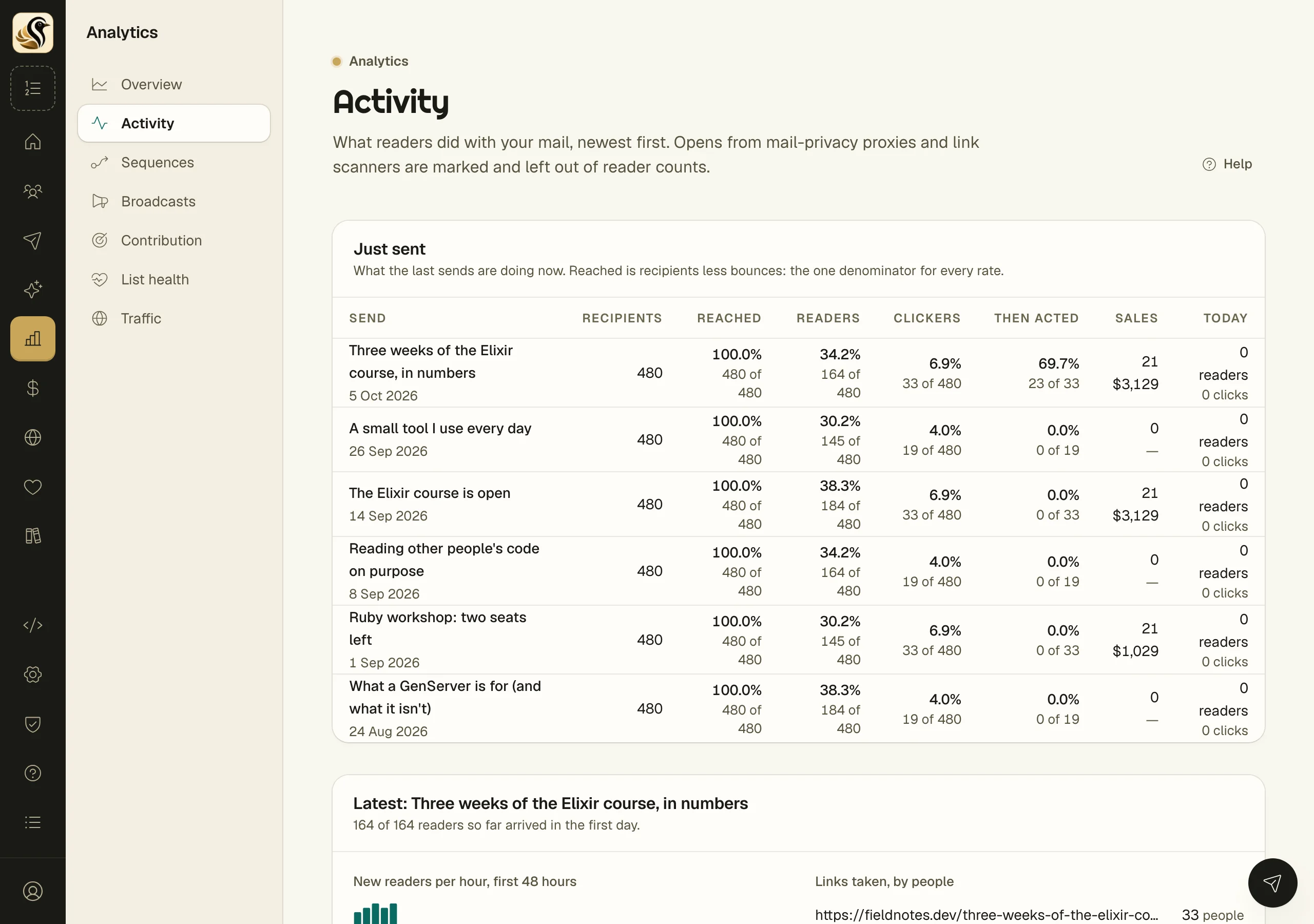
The Just sent columns
| Column | What it counts |
|---|---|
| Recipients | Everyone the broadcast was sent to |
| Reached | Recipients less bounces |
| Readers | Reached people who opened it, leaving out machine opens |
| Clickers | Reached people who clicked a link |
| Then acted | Clickers who did something more within 7 days of their first click, such as submitting a form or entering a sequence |
| Sales | Sales credited to this send, with the revenue |
| Today | Readers and clicks so far today |
Every rate shows the two numbers behind it, such as "164 of 480", so you can see what it is a share of. Unsubscribes are left off this table on purpose. They are in the event list below and on Broadcast stats.
The latest send
- New readers per hour charts the first 48 hours. The line under the title says how many readers arrived in the first day.
- Links taken, by people lists each link with how many people clicked it, not how many clicks.
- Submitted a form and Entered a sequence count what readers did next.
- Form views, 3 days after counts views of your forms in the three days after sending, against what a normal three days looked like the week before.
The event list
Each event shows when it happened, what it was, who, which mail, and a detail. A click shows the link. An unsubscribe says whether the person left one series, the newsletter, or everything. Bounces are labelled Hard bounce or Soft bounce.
Events appear within a second or two of happening.
What opens do and do not tell you
Many opens are not people. Apple Mail's privacy feature and link scanners open mail automatically. Kōlea marks those opens Machine, with the reason in the detail column, such as "Apple Mail privacy proxy" or "Seconds after sending", and leaves them out of every reader count. Even so, treat opens as an estimate. Clicks are the stronger sign that someone read the mail.
Things to know
- This screen only reads. Nothing on it sends or changes anything.
- Sales use last-touch credit: the last mail a buyer clicked before buying.