The Council review
Three readers from your audience and an editor read your draft and tell you where it lands. Then you fix or dismiss each note, with Claude's help if you want it.
The Council is a peer review for a draft before it goes out. Three readers drawn from your audience read it: a fan, a skeptic, and someone in between. Then an editor tells you what to push further, what to cut, and where you sound like yourself. In the editor it is called Peer review.
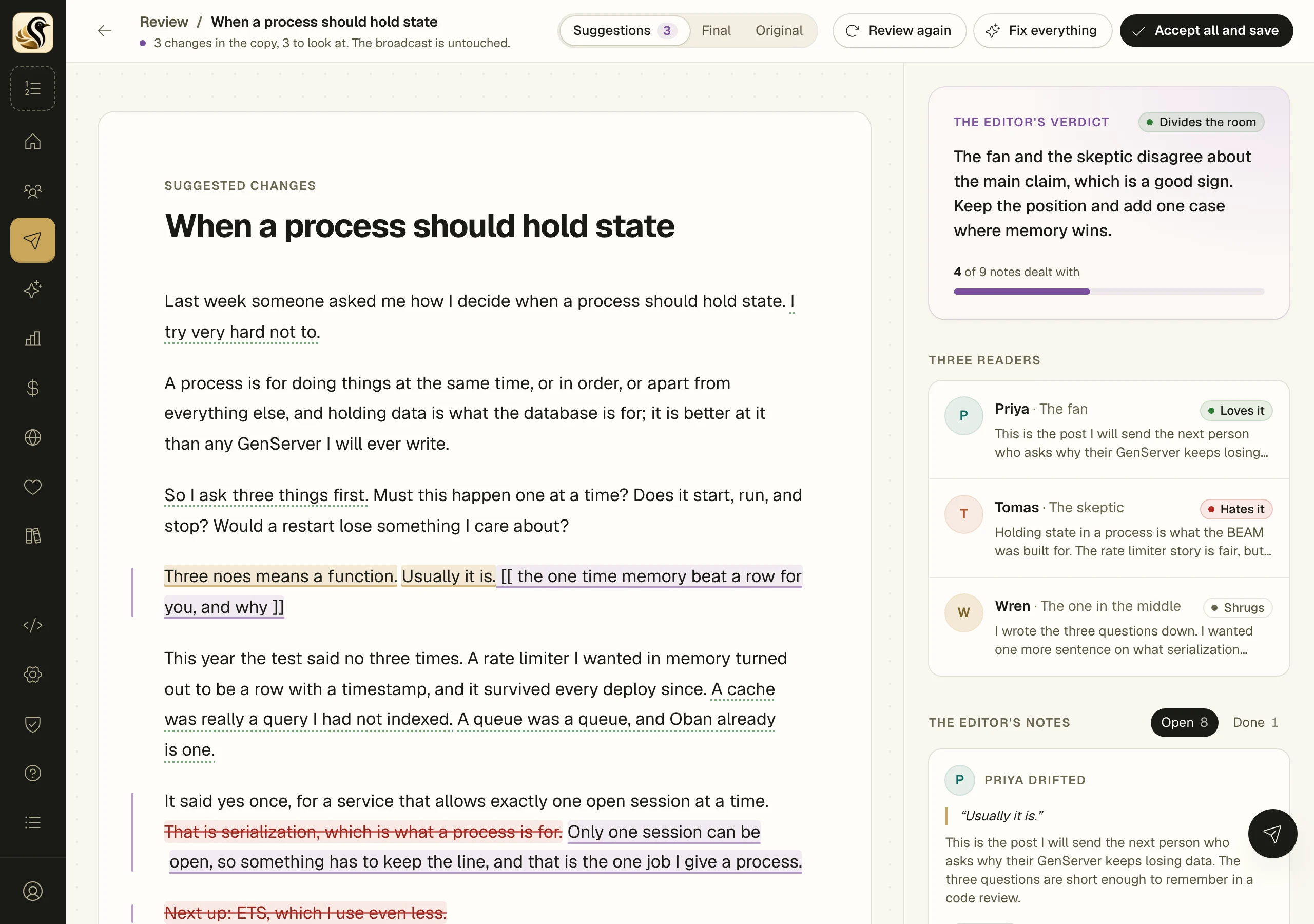
The review has a page of its own. Your draft sits on the left and the review runs down the right, like comments in a shared document. You can fix each note, or have Claude fix it as a suggested change, or dismiss it. Your draft doesn't change until you accept the changes.
Open the review
- In a broadcast or a sequence mail, find Peer review under AI helpers in the column beside the editor.
- Click Review (or Open, once it has been reviewed). What's on screen is saved first, and the review page opens.
- The first time, click Start the review. To change who the readers are first, click Change who reads it and set the four choices: Who they are, How much they know, Why they read you, and How they read. They are saved for every post.
It takes about a minute. A skimmer on a phone gets lost in different places than someone who reads every word, so the last choice matters more than it looks.
Read the review
- The editor's verdict is at the top of the column. Divides the room means some readers will love it and some will hate it, which is what you want. Plays it safe means most will shrug, and the notes point to where you could take a clearer position.
- Three readers: The fan, The skeptic, and The one in the middle, each marked Loves it, Hates it, or Shrugs. Click one to read the whole reaction, the line that Hooked me and the line that Lost me.
- The editor's notes: where each reader drifted, straight talk, ideas to cut, ideas to push further, and lines that sound like everyone.
Lines the notes are about are highlighted in gold in your draft. Click a highlight and its note lights up in the column, or click a note to jump to its line. Lines that hooked a reader or sound like you have a dotted green underline.
Fix or dismiss each note
Every open note has two buttons:
- Fix it: Claude makes the smallest change that answers the note. The change shows up on the note's card and in your draft, crossed out and underlined, with a purple bar beside the paragraph. Click Accept to keep it or Reject to take it back out.
- Dismiss: you've read it and you're leaving it. Dismissed notes move to Done, where Reopen brings them back.
Fix everything in the bar at the top sends every open note to Claude at once. You still accept or reject each change.
When a note needs something only you know, like a story or a number, Claude leaves a placeholder in double square brackets, for example [[ the time the rate limiter fell over ]]. Fill it in before you send. A fix that would change a link, a merge tag, an image, or a button is thrown out before you see it.
The switch at the top changes what the page shows: Suggestions (the changes marked up), Final (the copy with every change in), or Original (your draft as it was).
Save the changes
Click Accept all and save and confirm. Every change still in the copy goes into your broadcast or sequence mail, including ones you haven't accepted one by one. Until then your draft is untouched.
If the draft was changed in the editor after the review started, the page says so, and Start over from the saved draft throws Claude's changes away and begins again from what you saved.
Review it again
Click Review again in the bar to have the readers read the copy as it stands, with Claude's changes in it. The notes start fresh. Changes from the last review stay in the copy, listed under Changes from the last review, until you accept or reject them.
Things to know
- The draft needs about 120 words before there is enough to review.
- Every quote in the review is taken word for word from your draft, so you can find the sentence it means.
- Each review and each fix is one AI call, from your monthly AI budget or your own key. Fix everything is one call, however many notes it covers.
- Peer review appears only when AI writing help is on for your account.