
Skip to content

Free migrations

Bring your list with you

Move from Kit, Ghost, Mailchimp, Drip, or a CSV. Your subscribers, tags, unsubscribes, and old posts come with you, and anyone who unsubscribed stays unsubscribed.

Moving is free on every plan, and you don't need a credit card.

How moving works

  1. 1

    Connect

    Paste in an API key from your old service, or upload a file. Kōlea only reads from your old account and never changes anything there.

  2. 2

    Watch it come over

    The import runs in the background and you can watch its progress. If you stop it, it picks up where it left off.

  3. 3

    Read the report

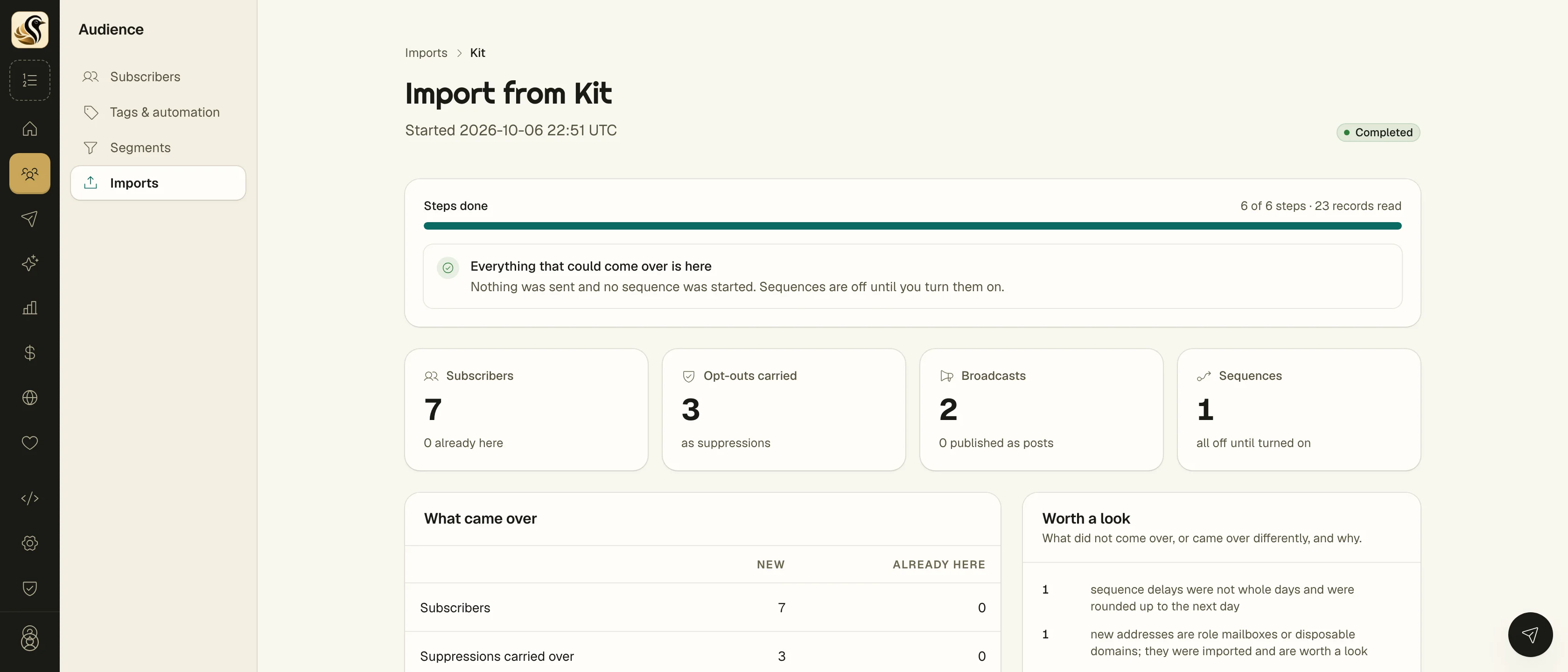
    When it's done, a report shows what came over, what didn't, and why. Sequences come over switched off, so nothing sends until you're ready.

An import's final report

What comes over

Here's what each service lets us bring over. If something can't come, the report will tell you, so there are no surprises later.

Kit (ConvertKit)

With your Kit API key.

Comes over

  • Subscribers and custom fields
  • Tags
  • Unsubscribes and bounces, as suppressions
  • Broadcasts, as sent mail with their totals
  • Sequences and their emails, switched off

Stays behind

  • What starts each sequence (Kit's API doesn't share it, so you'll set that up again)
  • Sequence stats, which Kit only shows inside its own app

Ghost

With your Admin API key, or a content export.

Comes over

  • Members, with unsubscribes carried over
  • Posts, published, with the same links as before
  • Tags, as topics
  • Your theme, installed but not switched on

Stays behind

  • Members from a content export (use the Admin API key for those)
  • Ghost's internal #tags

Mailchimp

With your Mailchimp API key, one audience at a time.

Comes over

  • Contacts and their status
  • Tags
  • Unsubscribes and bounces, as suppressions
  • Sent campaigns, with their content and report numbers

Stays behind

  • Automations and journeys (Mailchimp's API doesn't share their emails)
  • Archived contacts, and contacts who never opted in

Drip

With your Drip API key.

Comes over

  • Subscribers and custom fields
  • Tags
  • Unsubscribes and bounces, as suppressions
  • Broadcasts, as sent mail

Stays behind

  • Campaigns (Drip's API doesn't share their emails)
  • Broadcast stats, which Drip's API doesn't share

CSV

From any service that exports a spreadsheet.

Comes over

  • Email, name, and any other columns you want to keep
  • Tags per row
  • Unsubscribed rows, as suppressions

Stays behind

  • Anything that isn't in the file, of course

Your readers

Nobody gets email they didn't ask for

If someone unsubscribed at your old service, they're still unsubscribed here. Addresses that bounced stay blocked. Nobody gets added to a sequence they never joined.

Imported sequences come over switched off, and your new account won't send anything until you tell it to.