The Ghostwriter and your voice
Hand it a topic and your take, and it drafts the email in a voice you tune. You still edit and send it.
The Ghostwriter gets you past the blank page. Give it a topic and what you think about it, and about a minute later a draft is in the editor, written in a voice you set up once and checked for slop. It never sends anything. You still edit the email and send it yourself.
Tune your voice
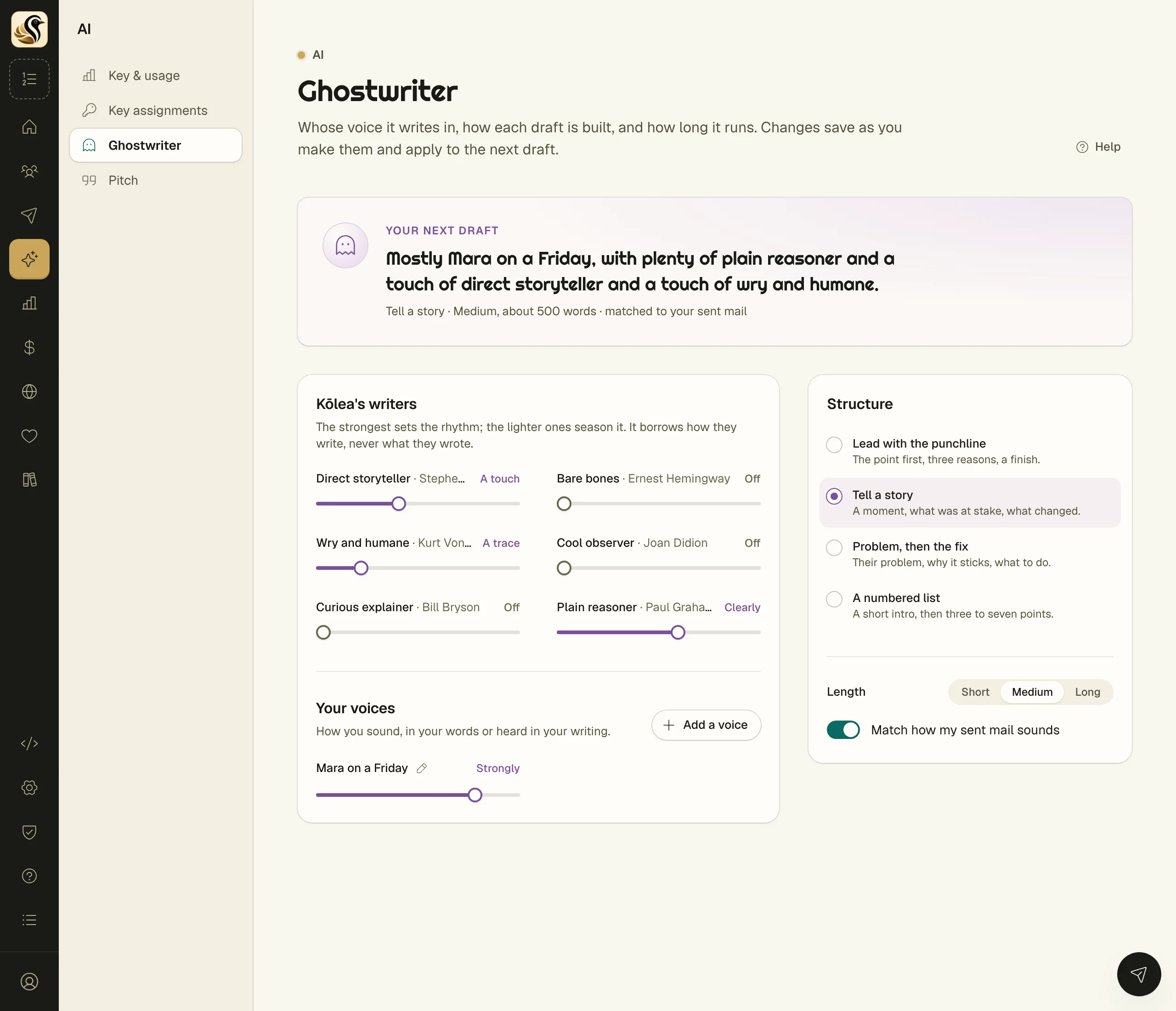
- Open AI > Ghostwriter.
- Under Kōlea's writers, move the sliders. Each one borrows how a writer writes (never what they wrote): Direct storyteller, Bare bones, Wry and humane, Cool observer, Curious explainer, and Plain reasoner. The strongest sets the rhythm; the lighter ones season it.
- Under Your voices, click Make it sound like you (or Add a voice) to add your own voice with its own slider.
- Pick a Structure: Lead with the punchline, Tell a story, Problem, then the fix, or A numbered list.
- Pick a Length: Short (about 250 words), Medium (about 500), or Long (about 900).
- Leave Match how my sent mail sounds on to have it read your recent sent mail for tone.
Everything saves as you change it. The card at the top, Your next draft, says the blend in plain words.
Describe a voice of your own
Give the voice a Name and fill in How it sounds the way you would brief a writer you trust. Not sure how to put it? The panel beside it offers two ways:
- Kōlea's AI: paste Some of your writing (150 words or more) or a link under Or a page of yours, then click Describe my voice. It fills in the form and shows what it cost. Read it, change anything that isn't you, then click Save voice.
- Your own AI: click Copy prompt, use it in your own chat tool with a few things you've written, and paste back what it gives you.
You can keep up to six voices of your own.
Write a draft
- In a broadcast or a sequence mail, find the Ghostwriter card in the column on the right and click Start a draft.
- Fill in The topic and, if you like, Your take. The more of you in the take, the less it sounds like anyone else.
- Set How finished, from Just an outline to Third round.
- Click Write it.
When it lands you see the slop score, subject ideas (click Use this to take one), and what the call cost. Click Close and read it.
Write a whole sequence
Open Mail > Sequences and click Ghostwrite one. Pick The template it follows, fill in The topic, What it should do, and Your notes, and choose the pitch (the marketing approach, such as Story to offer). Give it a Sequence name, choose Starts when, and click the Ghostwrite button at the bottom. It makes a paused sequence and drafts every mail.
What happens next
A broadcast draft replaces what was in the editor as one change, so one undo brings your words back, and it isn't saved until you save. In a ghostwritten sequence, every mail opens with a note asking you to read it over, and the sequence can't go live until those notes are gone. Nobody is added and nothing is sent.
Things to know
- Anything it does not know about you stays in double square brackets for you to fill in. It never invents your stories.
- How finished at the second or third round checks the draft against the Slop meter and revises once if it needs to.
- Every call shows on AI > Key & usage with its cost.