The fan
The bakery is the bit I'll remember. I built a to-do app first too and never finished it.
Newsletter · Site · Shop · Wall of love · A plan
Building was the fun part. Nobody is reading your changelog. Kōlea writes the launch email in your voice, sends the sequence, and shows you which message made the sale on your Stripe.
If you'd rather not leave the terminal, your AI can run all of it over MCP.
Free for your first 500 subscribers, no credit card needed. We'll move your list from Kit, Ghost, Mailchimp, or Drip for free.
The tour · 9 minutes
One bill
Kit sends your email, Ghost publishes it, Shopify sells your stuff, and testimonial.to collects the kind words. None of them know the others exist, and none of them tell you what to do next. Kōlea does all four on one list, and it comes with a plan.
What the four apps don't have
Kit knows what you sent. Shopify knows what you sold. Neither knows the other exists. One list does.
01 Write
Every week there's a newsletter to send, and some weeks there's nothing in your head. Kōlea gives you a first draft to argue with, a meter that catches prose that sounds like a machine wrote it, and a council of readers who review it before you send.
The Ghostwriter


A ghostwritten email is the easiest place for machine prose to slip out under your name. So the Ghostwriter is held to the same rules as the slop meter, and to a few of its own.
Voices on the sliders
No invented facts
Every number, name, quote and result has to come from your notes. If it isn't there, it isn't in the draft.
Your stories stay yours
Where a moment from your life belongs, it leaves a note in [[ double brackets ]] saying what goes there.
Checked for slop
Scored on the way back. If it isn't clean, it revises once with the meter's findings and you get the better draft.
Nothing saved, nothing sent
The draft lands in the editor unsaved. You read it, change it, and send it yourself, or don't.
The slop meter
Readers can tell when a model wrote something, usually by the second sentence, and that's where they stop reading. So I wrote down the habits that give it away.
The slop meter scores every draft from 0 to 100 as you type, yours or the Ghostwriter's, underlines what it finds, and tells you why each one reads badly. It runs in your browser. Your draft isn't sent anywhere to be scored, and no model is asked what it thinks.
Here's the thing:
"Here's the thing" An announcement that a sentence is coming. Delete it and say the sentence.
It's not about syntax, it's about thinking in processes.
"It's not X, it's Y" Knocking down a claim nobody made, to make the real one sound deeper. Say Y once.
Faster. Cleaner. Smarter.
Staccato run Fragments lined up for a drumbeat. Join them into one sentence that says something.
Let that sink in.
Mic drop A line telling the reader how to feel about the last line. Trust the last line.
In today's fast-paced landscape
Grand opening Opening from orbit. Start with the specific thing that happened to you this week.

A draft I filled with slop on purpose. Mostly.
The reader council
Tell Kōlea who reads you with four choices: what they do, how much they know, why they read, and how patiently. Then ask for a review.
A fan, a skeptic, and someone in between each read the draft on your screen and say what they think. An editor reads it last and tells you what to keep and what to cut.
Then fix it, right there. Every note has a Fix it button, and Claude makes the change in a copy of your draft, marked up like tracked changes in Word. Accept it, reject it, or dismiss the note and move on. Your draft stays exactly as it was until you say so.
Your readers
The fan
The bakery is the bit I'll remember. I built a to-do app first too and never finished it.
The skeptic
Fine, boring first. But some people learn by building the fun thing. Say who this advice is for.
In between
I'd like one line on what a context is before the paragraph that leans on it.
The editor
Fill in the morning your sister texted you. That's the whole email. Keep the chat room as the setup, and cut the second half of the last paragraph.
An example review of the draft above, so you can see the shape of it.
The review opens next to your draft, like comments in a shared doc. Click a highlighted line and its note lights up. Claude's fixes show up in place, crossed out and underlined, so you can see exactly what changed before you keep it.
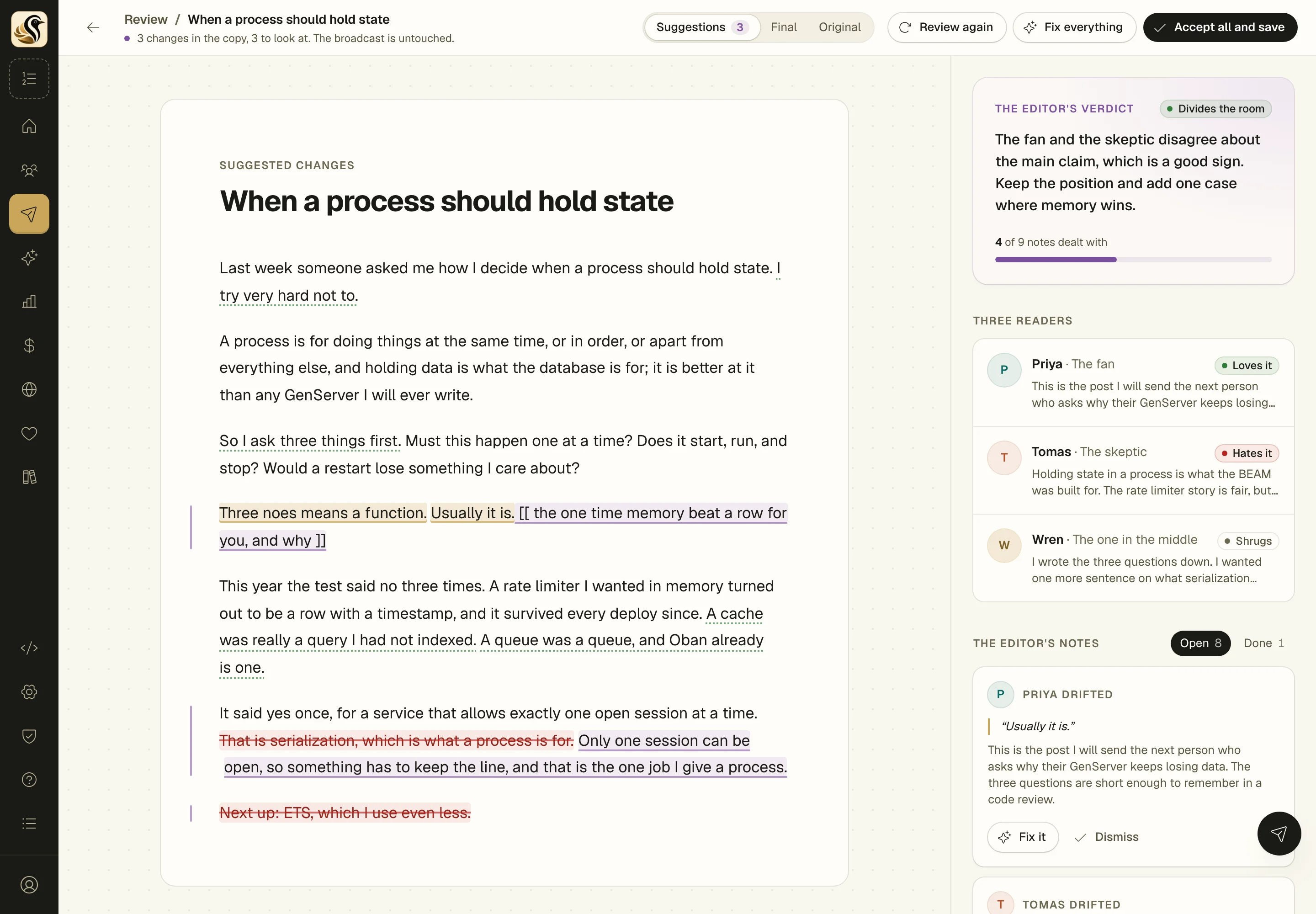
Fix it
Claude makes the smallest change that answers the note. Where only you know the story, it leaves a [[ placeholder ]] for you.
Dismiss
Read the note, decide it's wrong, and move on. Dismissed notes wait under Done in case you change your mind.
Fix everything
One click sends every open note to Claude. You still accept or reject each change on its own.
Review again
The readers read the copy with Claude's changes in it, so you find out if the fixes landed.
Nothing in your draft changes until you click Accept all and save. More about the reader council
Kōlea's AI, included
Every plan comes with a monthly AI allowance and nothing to set up. You see what each call cost, and it stops at the limit instead of surprising you.
Or bring your own key
Paste an OpenRouter key and pay OpenRouter directly, with no limit from us. Either way the writing is done by Claude, and your prompts and its answers aren't kept.
Why Kōlea
They're all good at what they were built for. But most people end up paying for two or three of them, plus a testimonial widget and an AI writing tool, none of them talk to each other, and none of them tell you what to send next. Kōlea is one place with a plan in it, built for people who write and sell what they make.
Only in Kōlea
Your site runs Ghost themes, your sales go through your own Stripe, and Kōlea takes nothing from them.
02 Set up
Nine steps, one question at a time, and each one comes with an answer already filled in from what you've told it so far. Stop whenever you like. It keeps your place.

Checklist
About the AI bit: setup tells you what the writing helpers do before any of them run, then asks whose AI to use: the allowance on your plan, or your own OpenRouter key. Nothing you do in setup sends a single email.
03 Sell
Launch Studio walks you through it in seven steps on one screen. Every step reads from the brief you write in the first one, so you only have to explain your offer once.

Three plays
Three ways to write the sales page
AI can draft an outline from your brief if you want one. The words on the page are yours.
The emails that lead up to a sale and the ones that follow it are wired together, so nobody gets pitched a thing they already own.
Before · Pre-sale sequence
Lead Magnet to Offer
Stops the moment they buy. Nine other starters to choose from, including Soap Opera, Seinfeld Week, and Webinar Follow-up.
The sale · Your Stripe
Elixir in Production
The sales page, on your own site
One payment $149
Buy with Stripe Checkout
+$149.00 credited to "Doors close tonight"
After · Post-sale
A customer, not a lead
The tag can start New Customer Onboarding, and Win-Back is there for the ones who drift.

Stripe
You connect your own Stripe account with one click. Kōlea reads your sales and opens Checkout for your buyers. It never moves money itself, and the money goes where it always has.
0%
of your sales, on every plan, every transaction, every time. Substack keeps 10% forever. Kōlea takes nothing, ever.
Testimonials
You've probably seen the testimonial tools: a page full of hearts, a widget for your site, and another monthly bill. Kōlea has one built in. And because it knows your readers, every letter on your wall comes with proof of who wrote it.
★★★★★
I'd bought three Elixir courses before this one and quit every one of them by week two. I finished this one. The job queue chapter alone paid for it.
Dana K.
Verified buyer · Elixir in Production · reader since 2023
I open these emails before the rest of my inbox. That's the whole review.
Marcus T.
Reader since 2021 · 162 issues
★★★★★
The section on supervisors finally made it click. I'd read the docs four times.
Lena W.
Verified buyer · Elixir in Production · reader since 2024
Bought the cheatsheet on a whim, then the course a month later. Both live on my desk now.
Sam O.
Verified buyer · Elixir cheatsheet, Elixir in Production
Clear and funny, and it never talks down to you.
Priya S.
Finished the welcome series · 38 issues
The best explainer on OTP I've read, and I've read most of them.
Jo R.
Said on Bluesky · 12 Sep 2026
Example letters, so you can see the receipts. Kind words people said somewhere else can go up too, with where and when they said them.
The hard part of testimonials is asking at the right moment without making people fill in a form. Kōlea already knows who they are, so they only have to write.
A week after they buy
Launch Studio's last step is one short note, a week after the sale. Is it working for you? If it is, here's a link to say so. Put the same link in any after-sale sequence you write.
And if you're enjoying it, would you tell other people? Tell me how it went
A link in any email
Type
{{testimonial_link}}
into a broadcast or a sequence mail. Every reader gets their own link. There's no
name or address to fill in, because Kōlea already knows who's writing.
A link you can share anywhere
One public page for your whole account, or one per offer. Put it in a video description or a social post. A letter counts once the writer confirms their email, and it's marked a verified buyer only if that address actually paid.
Nothing goes up unless the writer ticks the box saying it's OK, and they can take it back from their preferences page whenever they like. You approve, feature, and order the rest.
Do the letters sell? Kōlea checks.
A share of the people who visit an offer's page don't see the letters. Kōlea compares the two groups and tells you whether the letters help, hurt, or it's too close to call. It won't say anything until each side has 100 visitors and there are 10 sales between them.
04 Know
Most email tools stop at opens and clicks, and your shop, your site, and your testimonials each keep their own numbers somewhere else. Kōlea runs all of it on one list, so the numbers connect. Which email made each sale, in dollars. What each post earned, next to how many people read it. Which sequence is sending and which one has people sitting idle. Who left what, and why. Every percentage shows the two numbers behind it, and everything that happens on your account is written down where you can search it.
What you usually get
Apple opens mail on its own, so that first number is mostly a robot being polite. Kōlea never counts an open toward anything.
What Kōlea tells you
"The Elixir course is open" earned $2,086 from 14 sales.
Every one of those buyers clicked that email within 7 days of paying.
Revenue by send · Last 30 days
$6,407
43
sales
40 / 43
traced to an email
| Send | Kind | Share | Sales | Revenue |
|---|---|---|---|---|
| The Elixir course is open | Broadcast | 14 | $2,086 | |
| Doors close tonight | Broadcast | 13 | $1,937 | |
| Lead Magnet to Offer | Sequence | 9 | $1,341 | |
| Elixir cheatsheet | Form | 4 | $596 | |
| Direct, no email clicked | Direct | 3 | $447 |
I got tired of tools that estimate. These are the rules, and you can check every one.
The last click wins
Inside a window you set: 7 days for a broadcast, 30 for a sequence or a form. A campaign named on the sale outranks the click.
Opens never count
Apple Mail opens everything it receives. An open tells you about a mail server, not a person.
Credit is fixed when the money lands
Change your windows next month and last month's sales stay where they were.
Goals you can watch move
Set one for a month, a quarter, or a year, and see which mail moved it. Every percentage shows the two numbers behind it.
I've spent too many hours asking a tool what happened and getting a shrug. If something happened on your account, it's a row, and you can read it, search it, or ask your AI to.
An event log you can search
Everything that happened on your account, in plain words, kept 90 days. On the Logs page and over MCP.
Every message, and why
Every email Kōlea meant to send is a row: sent, bounced, or held, and the reason if it was suppressed.
Each reader's timeline
What a person signed up for, clicked, bought, and left, in order, on one page.
Every API and MCP call
Logged with its arguments, its outcome, and how long it took. The refused ones too.
Webhooks and Stripe
Every delivery attempt to your app, and every Stripe event, whether it was applied or ignored.
The send, as it happens
Watch a broadcast go out: delivered, bounced, clicked, live on the broadcast page.
Standard APIs, so there are no plugins to install or keep updated.
Bring your subscribers, tags, unsubscribes, and old posts. Anyone who unsubscribed stays unsubscribed, and your old Ghost links keep working. You can watch the import as it runs, and stop it whenever you like.
 Kōlea

A plan, your voice, a place for people to land, and the numbers that show what worked. Free for your first 500 subscribers, and we'll help you bring your list over.
No credit card required